
Julius lets you integrate with and pull data from your favorite tools.
This guide uses the Stripe API as an example to show you how to connect an external API to Julius.Julius supports calling APIs — at this time however Julius itself cannot be called via API
1
Step 1: Retrieve Your API Key
- In this case, we’ll walk you through the instructions for getting an API key from Stripe; however, this step will vary according to your specific need.
- Access your Stripe Developers Dashboard and select the “API keys” tab.
- In the Standard keys list or Restricted keys list, in the row for the key you want to reveal (in this case, it’s the Standard keys list), click “Reveal live key”.
- Once the key is visible, copy its value by clicking on it.
2
Step 2: Choose a Method to Add Your API Key to Julius
At the individual conversation level
At the individual conversation level
- Start a new conversation in Julius
- In the conversation window, click on the “Chat Settings” button, typically located in the upper right section
- Navigate to the “Secret Keys” section, designed for inputting external API keys
- Set a name for this API key
-
Paste the Stripe API key you copied earlier into the
Valuefield - Click the Checkmark to save this API key
At the user level, to be saved and applied across all conversations
At the user level, to be saved and applied across all conversations
-
Navigate to Chat Settings -> Secret Keys.
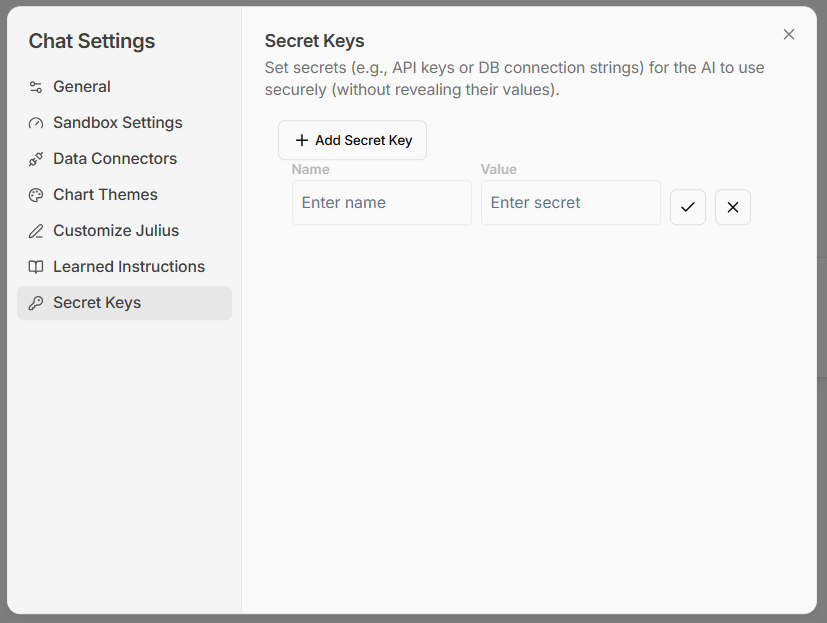
- Set a name for this API key
-
Paste the Stripe API key you copied earlier into the
Valuefield - Click the Checkmark to save this API key
3
Step 3. Call your API in Julius
- Navigate to a new conversation
- Inform Julius that you’ve added the Stripe API key
- Now, you’re all set to ask Julius to pull specific data from Stripe, be it transaction details, customer data, or any other relevant information.
Reach out to team@julius.ai for support or to ask questions not answered in our documentation.